Continuing the series on Exception Clean Code with Exception, in this article, I will explain try/catch in greater depth and vindicate try/catch from the myth that it inherently slows down program performance.
First, let me clarify what try and catch are:
tryis a Java keyword used to declare a block of code in which any thrownThrowablewill be handled by the subsequentcatchblock.catchis a Java keyword used to declare a block of code that will execute when catching aThrowablethrown by the precedingtryblock.
try and catch always go together as a pair.
1. Use Cases
- Catching all
Exceptions
| |
- Catching
IOExceptionfirst and genericExceptionlater
| |
Note that child (more specific) exceptions should appear first, and parent (general) exceptions should come after.
- Catching
IOExceptionandRuntimeExceptionin a single multi-catch statement
| |
2. Checked and Unchecked Exceptions
When working with Java, one of the aspects that often frustrates developers is Checked Exception, where the compiler forces you to handle the exception. If you don’t wrap code that throws a Checked Exception in a try/catch or declare it in throws, the compiler will fail with an error and prevent building—even if you know the exception will never occur. This leads to redundant and boilerplate code.
Take for example:
| |
or:
| |
Both will always require exception handling because their method signatures declare Checked Exceptions, even when you guarantee the inputs are valid. Your code ends up looking something like this:
| |
or:
| |
When it really should just be as simple as:
| |
So how do we distinguish a Checked Exception from an Unchecked Exception? Take a look at the diagram below:
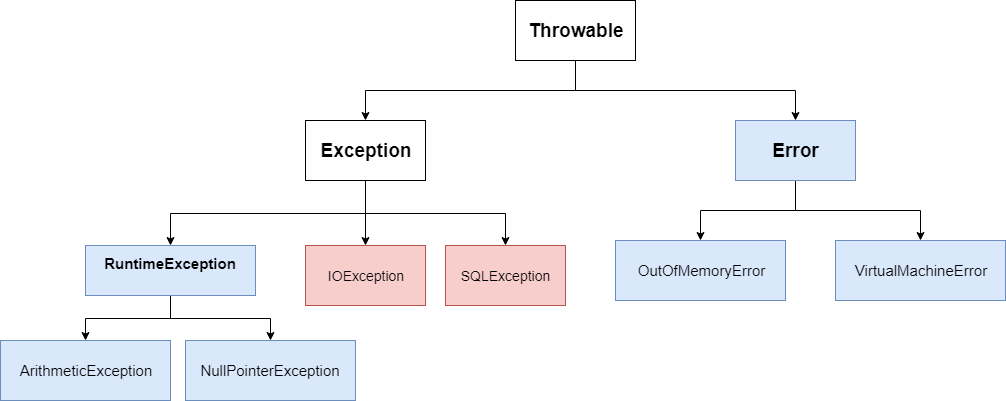
The blue classes and their descendants are Unchecked Exception (subclasses of RuntimeException or Error), whereas the red classes (subclasses of Exception that do not inherit from RuntimeException) are Checked Exception.
An interesting note is that .NET and other JVM languages like Kotlin, Groovy, and Scala do not have the concept of Checked Exception—developers handle exceptions where appropriate instead of being strictly forced by the compiler. Modern languages have largely moved away from this design ;))
3. Try Performance Impact
I have often heard from senior engineers advising against using Exception because it supposedly slows down the system. Instead, two alternative approaches are often suggested:
- Return an error code alongside the result, leading back to the issues discussed in
Clean Code with Exception. - Bundle all execution data into a context info object passed across methods. When an error occurs, the method sets an error state in this object, and the caller has to check for errors. A huge code smell ;((
At this point, you might think: is this the price to pay for speed? But that is actually not true. The try block itself does not slow down code. It merely establishes an exception table mapping bytecode regions. You can read more about it here.
So why does performance drop when an Exception is thrown?
The answer is that the process of collecting the stack trace slows down execution. And I have a dedicated post to help solve this problem!
Update: Check out the follow-up post here: Optimize Java Exception and benchmark :)